

















 On Demand
Sell custom merch from your own store. We make it and ship it in your name.
Promogator On Demand is our print-on-demand and drop-ship program for online stores, school and team shops, brands and platforms. Pick products from our catalog or design your own tees in our Online Designer, sell them at your own price, and send us each order. We make every order when it comes in and ship it straight to your customer under your business name.
- ✓$0 monthly fee
- ✓No minimum on designed tees
- ✓Ships in your name
- ✓Portal, CSV and API
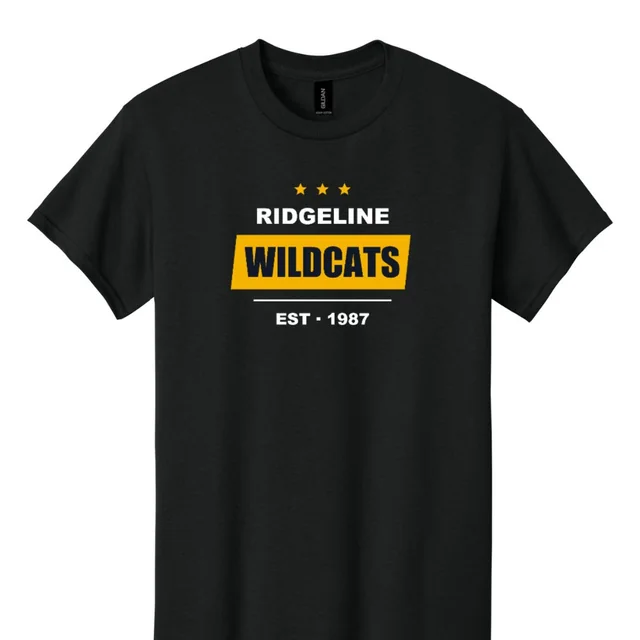
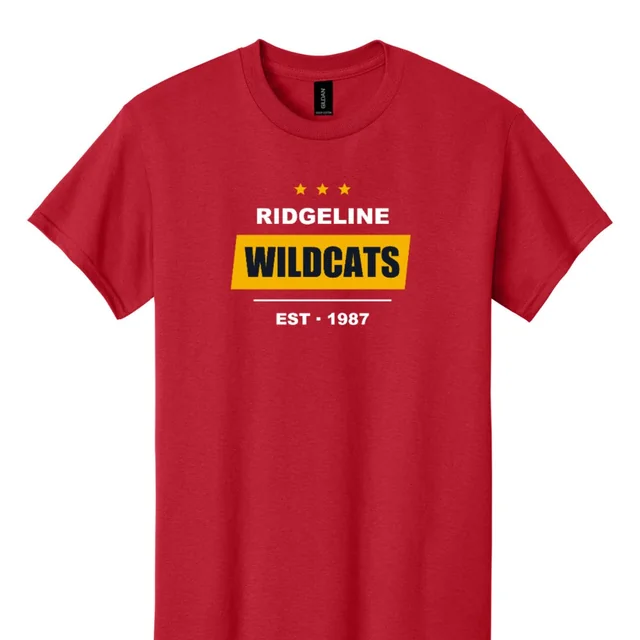
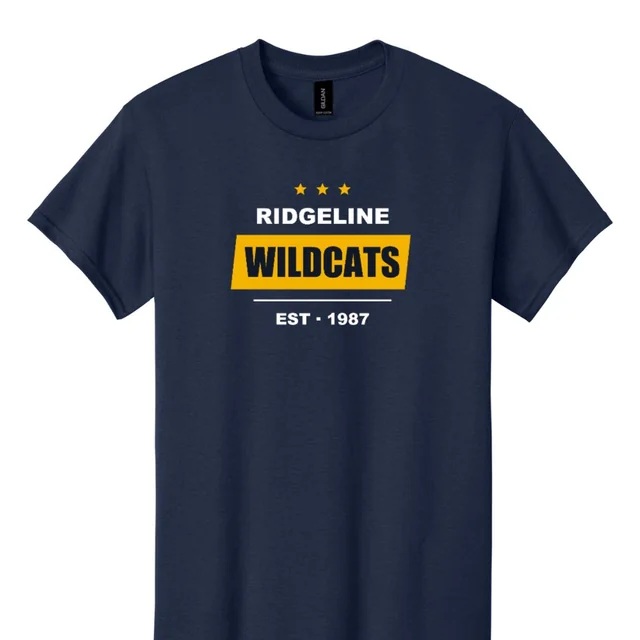
Your store sells it. We make it, pack it and ship it.
On Demand opens Promogator's catalog, our Online Designer and our production team to approved partners. You never buy stock or pack a box: each order you send us is made to order and shipped to your customer, under your business name.
You pay us a wholesale NET price for each item, decoration included, plus shipping. You charge your customer whatever you like. The difference is your margin. Your NET prices, your products and your orders are all in your own partner portal inside your Promogator account.
Sell from our catalog
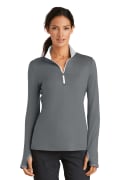
Choose decorated products we set up for you, each with a NET price per colour and size that already includes the decoration.
Design it, sell it
Design your own tees in our Online Designer, front and back, at true print size. Each design becomes your own SKUs, ready to sell.
What you get
- ✓Made to order. We make each order when it comes in, so you never hold stock or risk unsold inventory.
- ✓Blind drop-shipping. Your name and phone on the label, your name and order number on the packing slip, no prices in the box.
- ✓Your price, your margin. You see your NET price for every SKU before you sell it.
- ✓Your own SKUs. Order with your SKU or ours.
- ✓Three ways to order. Type it in, import products by CSV, or connect your store through our API with signed webhooks.
- ✓Tracking back to you. In your portal, through the API and by webhook, so you can tell your customer.
- ✓A real team. An account manager, a print check on every design, and an extra check on your first orders.
Built for anyone who sells to their own customers
If you have customers and a place to sell, On Demand lets you add custom products without a warehouse, a print shop or a shipping desk.
Online stores
Shopify, Magento, WooCommerce, BigCommerce or your own website. List our products or your designs and send us the orders.
School, team and club stores
Spirit wear for every team and season, printed one at a time as parents and fans order. No leftover boxes of shirts.
Brands, creators and artists
Turn your artwork into tees in dozens of colours and sell them under your own brand.
Agencies and resellers
Offer your clients custom merch stores and let us handle production and fulfilment behind your name.
Churches, non-profits and events
Fundraising and event merch with no upfront order: every shirt is made after it is sold.
Platforms and corporate portals
Connect your platform to our REST API: catalog, quotes, orders, tracking and invoices, with test keys to build against.
From sign-up to your customer's door, step by step
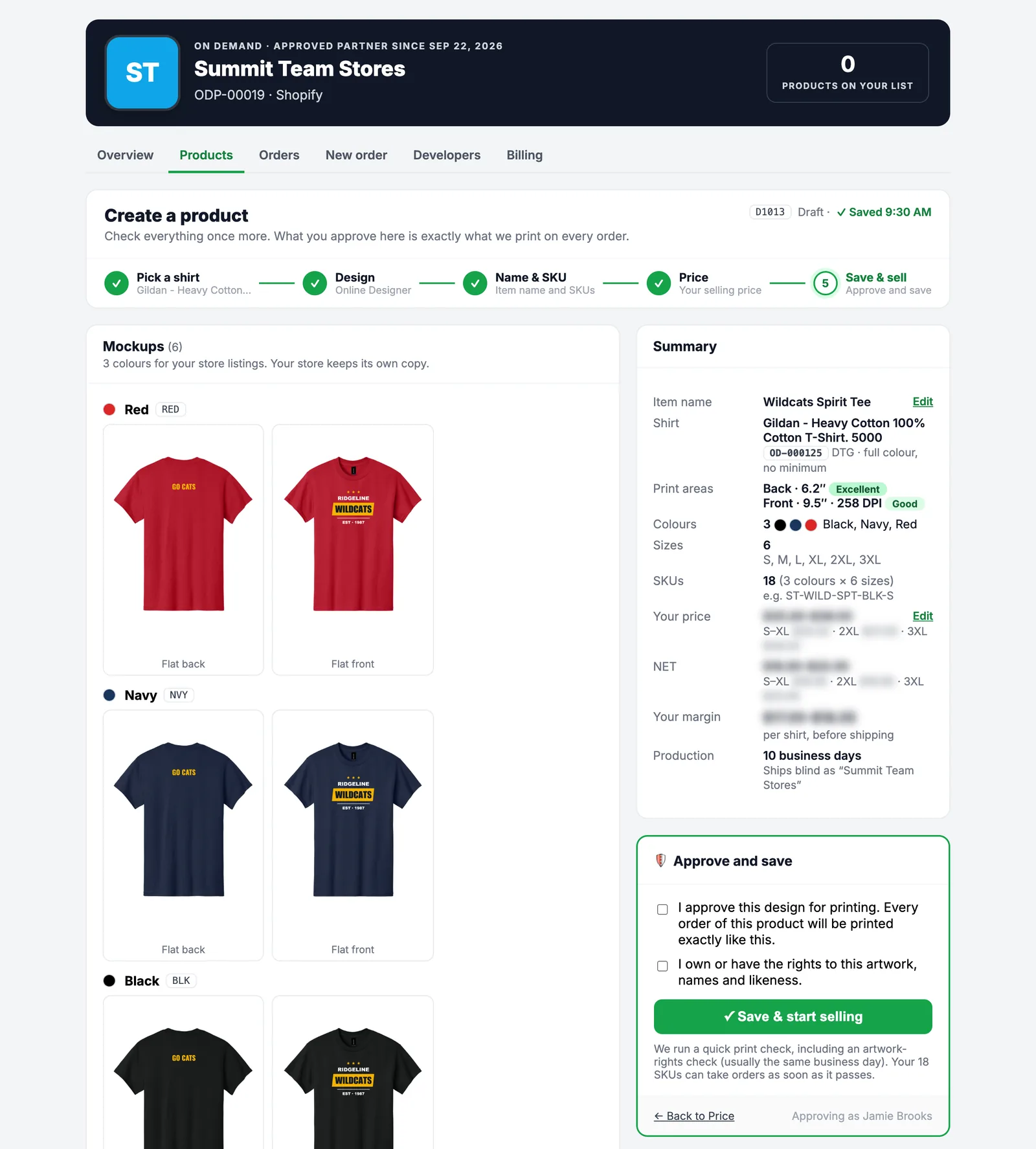
Here is everything that happens, in order. The screenshots are the real partner portal, shown with a sample partner (Summit Team Stores) and a sample design. Prices are hidden; partners see their own NET prices after approval.
Request access
Create a free Promogator account (or sign in), then open On Demand in your account and tell us about your business:
- your website or store address and your platform (Shopify, Magento, WooCommerce, BigCommerce, custom, or not sure yet)
- roughly how many orders you expect each month, and what you sell
- the products you would like to sell
- your resale certificate, if you have one, so we do not charge sales tax where it applies
We review every request by hand, usually within 1 business day, and email you our answer. If we need anything else, we ask on the same page.
What we look at
That you are a real business with a place to sell, the products that fit your store, and the volume you expect, so we can set you up with the right price list from day one.
Get approved and open your portal
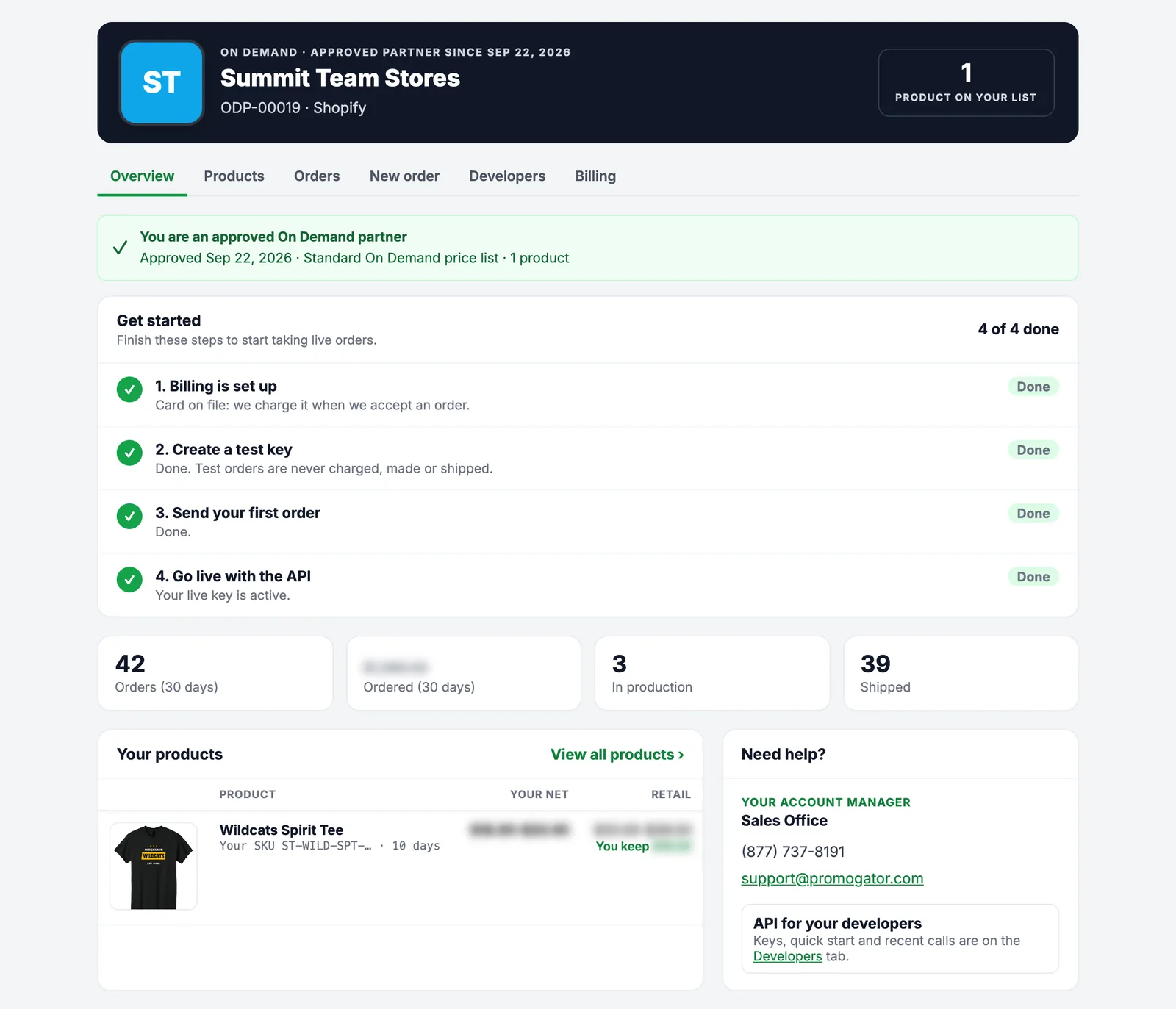
Once you are approved, your partner portal appears in your Promogator account, with your logo at the top and six tabs: Overview, Products, Orders, New order, Developers and Billing.
- Overview shows your getting-started checklist, your orders this month, what is in production and what has shipped.
- Billing is where you choose how to pay: a card on file that we charge when we accept each order, or invoice terms for approved accounts.
- Your account manager's name, phone and email are always on the page.
Choose what you sell
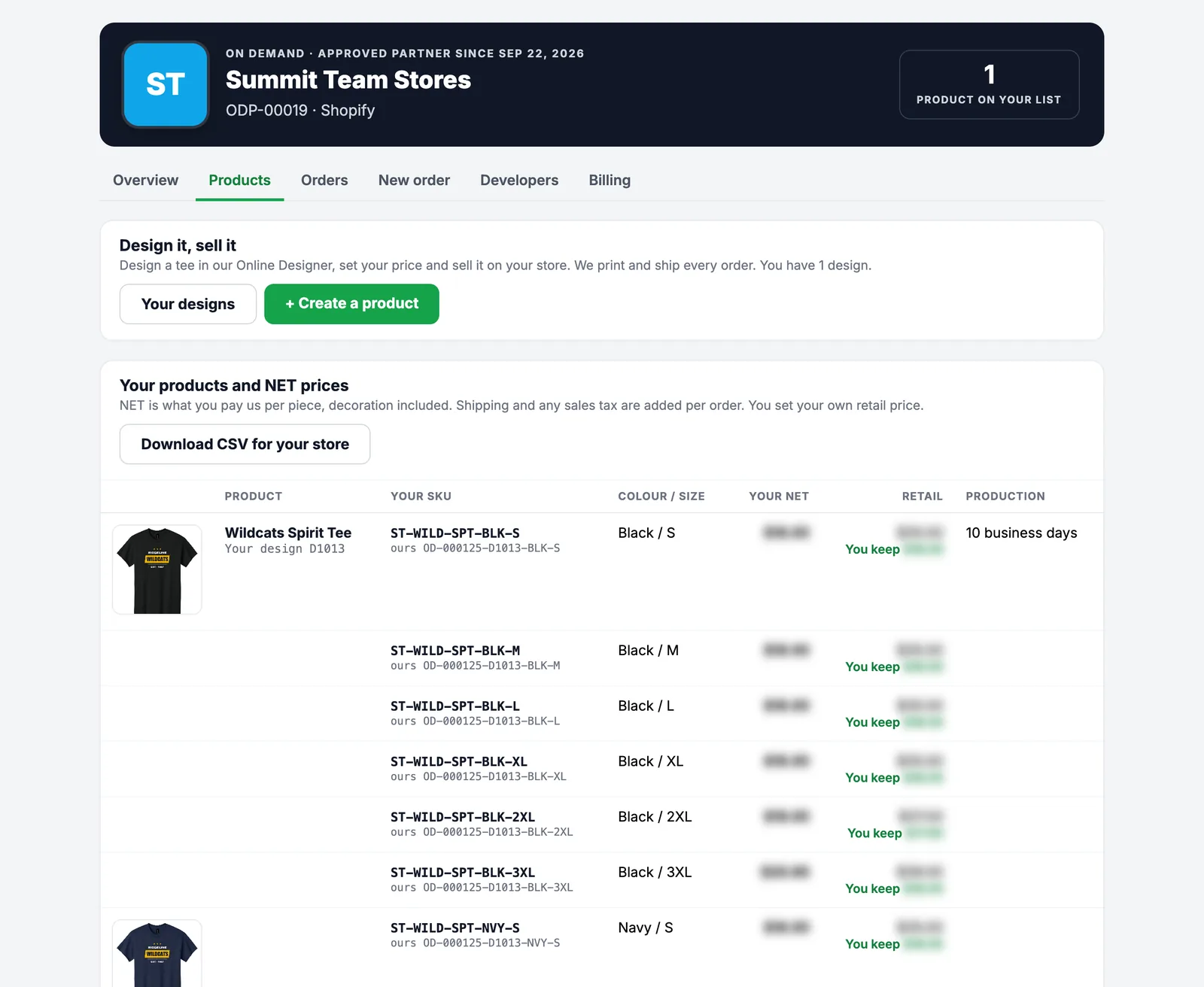
Your Products tab lists everything you can sell: one row per colour and size, with its SKU, your NET price, a suggested retail price, what you keep, and the production time in business days.
- Products you design show a picture of your design on each colour, and your own SKUs next to ours.
- Download CSV for your store gives you every SKU with title, colour, size, NET price, suggested retail, production days, shipping type and image links, ready to load into your store.
- Want something that is not on your list? Ask your account manager.
Design your own products (optional)
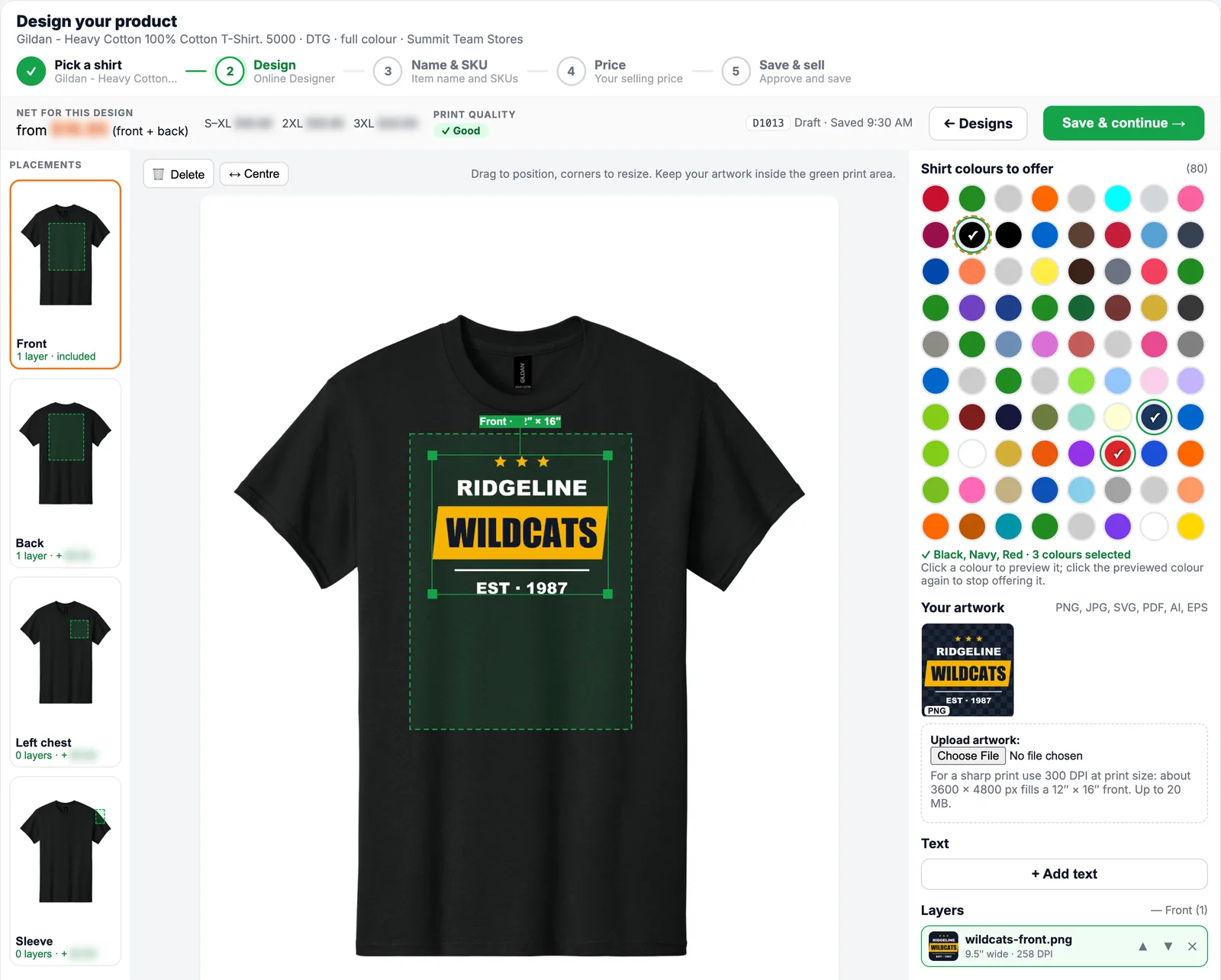
With Design it, sell it you create your own tees in five short steps: pick a shirt, design it, name it, price it, approve it. Our team runs a print check and your new SKUs are ready to sell.
List the products in your store
Put the products on sale wherever you sell: import the CSV, copy the mockups and SKUs, or read your catalog through the API. You set the price your customers pay and the shipping you charge them; we never see your store's prices.
Your SKU or ours
- ✓Your SKU:
ST-WILD-SPT-BLK-L(you choose the base, we add colour and size) - ✓Our SKU:
OD-000125-D1001-BLK-L(product · design · colour · size) - ✓Both work on the New order page and in the API.
Send us each order
When your customer buys, send us the order one of two ways:
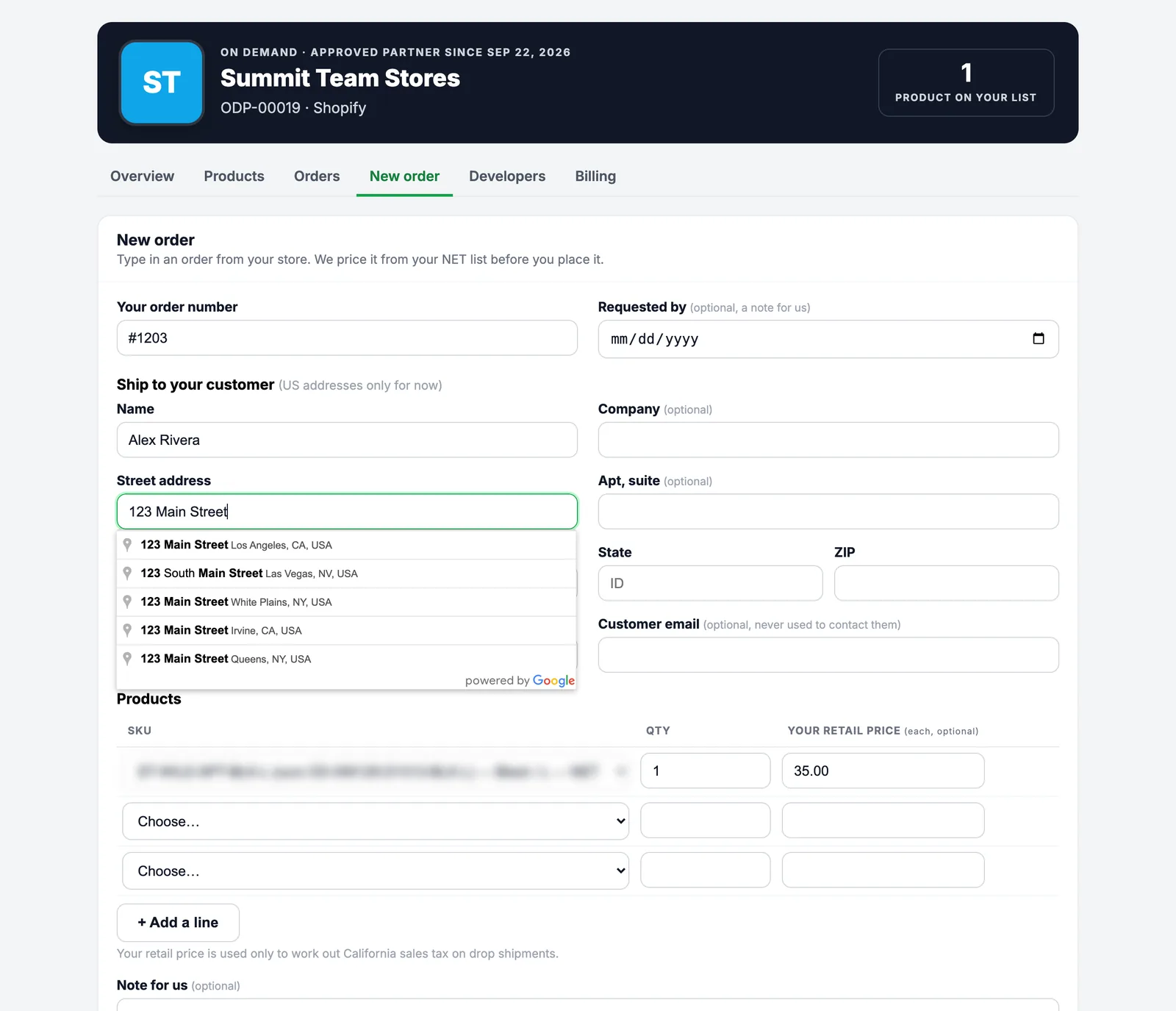
- New order in your portal: your order number, your customer's address (Google address lookup fills in the city, state and ZIP for you), and the SKUs and quantities.
- Our API, so your store or app sends orders automatically. Test keys let you try it first: test orders are never charged, made or shipped.
Before anything is placed you see the full price: items at your NET price, shipping, and sales tax only where we collect it. Nothing is ordered until you press Place order (or your API call creates it).
We make it and ship it in your name
Each order goes straight into production. Every product shows its production time in business days, so you can tell your customer what to expect.
- We print or decorate the item, check it, pack it and ship it to your customer.
- The box ships blind: your name, your logo and your order number, never ours (see what your customer receives).
- When it ships, the tracking number appears on your Orders tab, in the API and in an
order.shippedwebhook, ready to pass on to your customer. - Changed your mind? Cancel within 24 hours, as long as production has not started.
Your order, start to finish
- 1Your customer buys on your store at your price.
- 2You send us the order (portal or API) with your order number and SKUs.
- 3We confirm the price and charge your card (or invoice you), then start production.
- 4Your design prints from the exact files you approved.
- 5It ships blind to your customer; tracking comes back to you.
Get paid by your customer, keep the difference
Your customer pays you. You pay us the NET price, shipping and any tax for that order, by card or on invoice. Every order has an invoice in your portal and through the API.
The Price step of Design it, sell it shows this for every size before you approve a design.
Your design on a tee, ready to sell in five steps
Design right in your partner portal with our Online Designer. What you see is printed at true size, from the exact files you approve. There is no minimum and no setup fee: one shirt is enough.
One print, front or back, is included in the NET price. Each extra print area adds a small fee per shirt, shown in the designer before you approve. Shirts are printed DTG (direct to garment) in full colour.
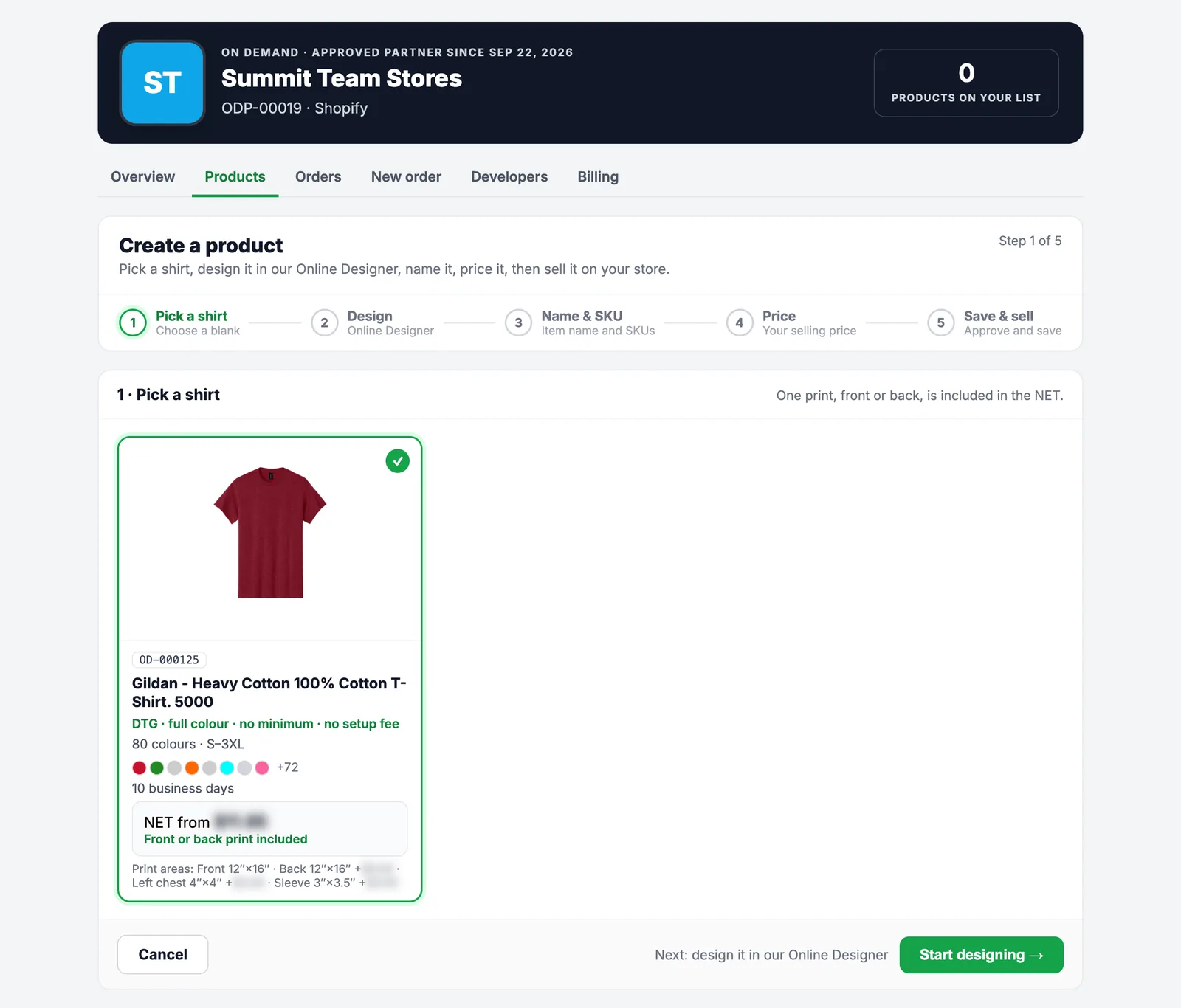
Pick a shirt
Start from a blank we have set up for print on demand, such as the Gildan 5000 Heavy Cotton tee, in dozens of colours and sizes S to 3XL. Each card shows the print method, the colours, the sizes, the production time and your NET price from.
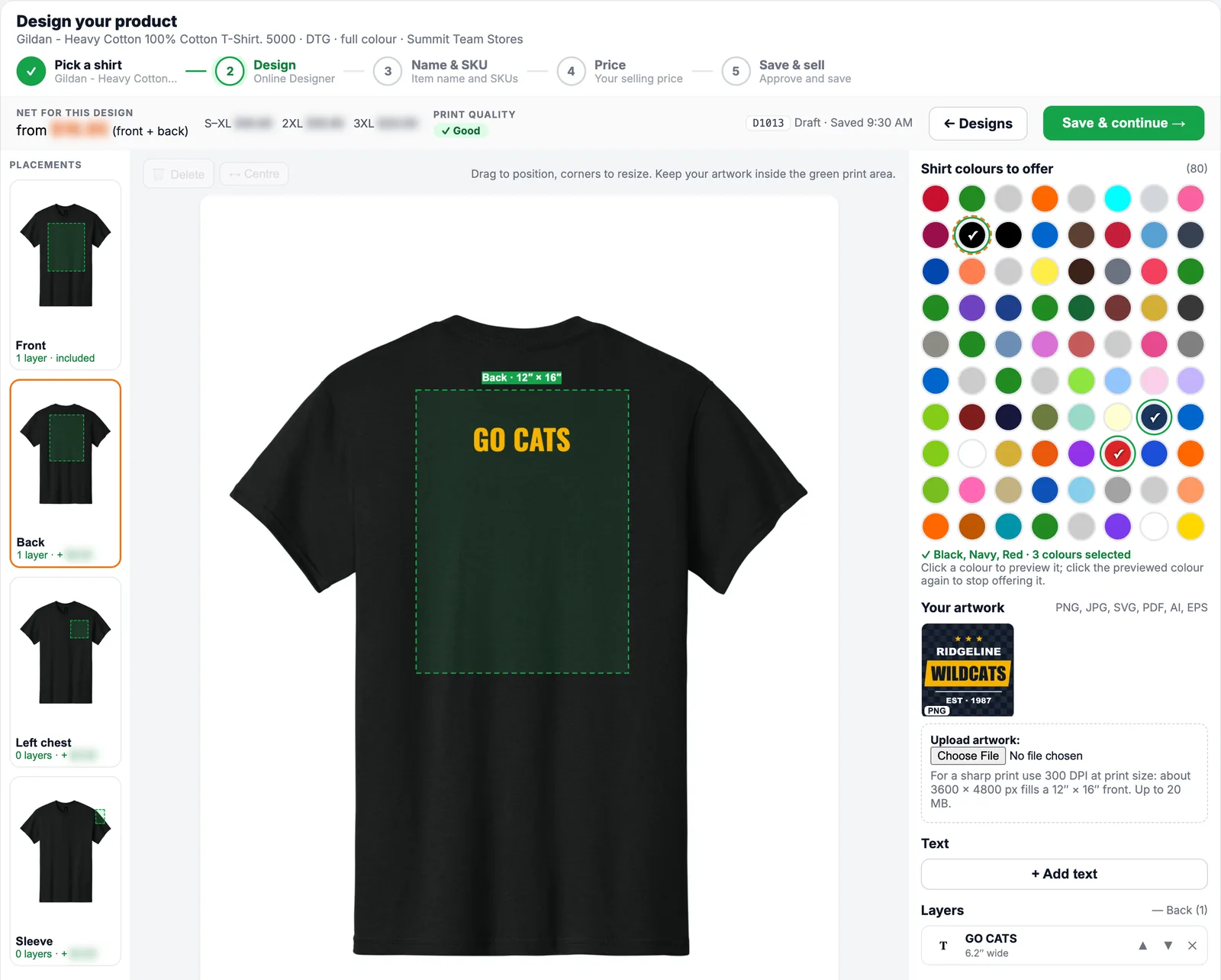
Design it in our Online Designer
- Upload your artwork: PNG, JPG, SVG, PDF, AI or EPS, up to 20 MB. Your files stay private to your account.
- Add text in a choice of fonts, colours, bold and italic.
- Place it at true size. The green box is the real print area on the shirt; drag to move, pull a corner to resize, and the size shows in inches.
- Front, back, left chest and sleeve: switch print areas from the left; each one shows its fee.
- Choose the shirt colours to offer and preview your design on each one.
- Live print quality: the designer checks the resolution of your art at the size you place it.
Your work saves as you go. When you continue, mockups of your design are made for every colour, front and back.
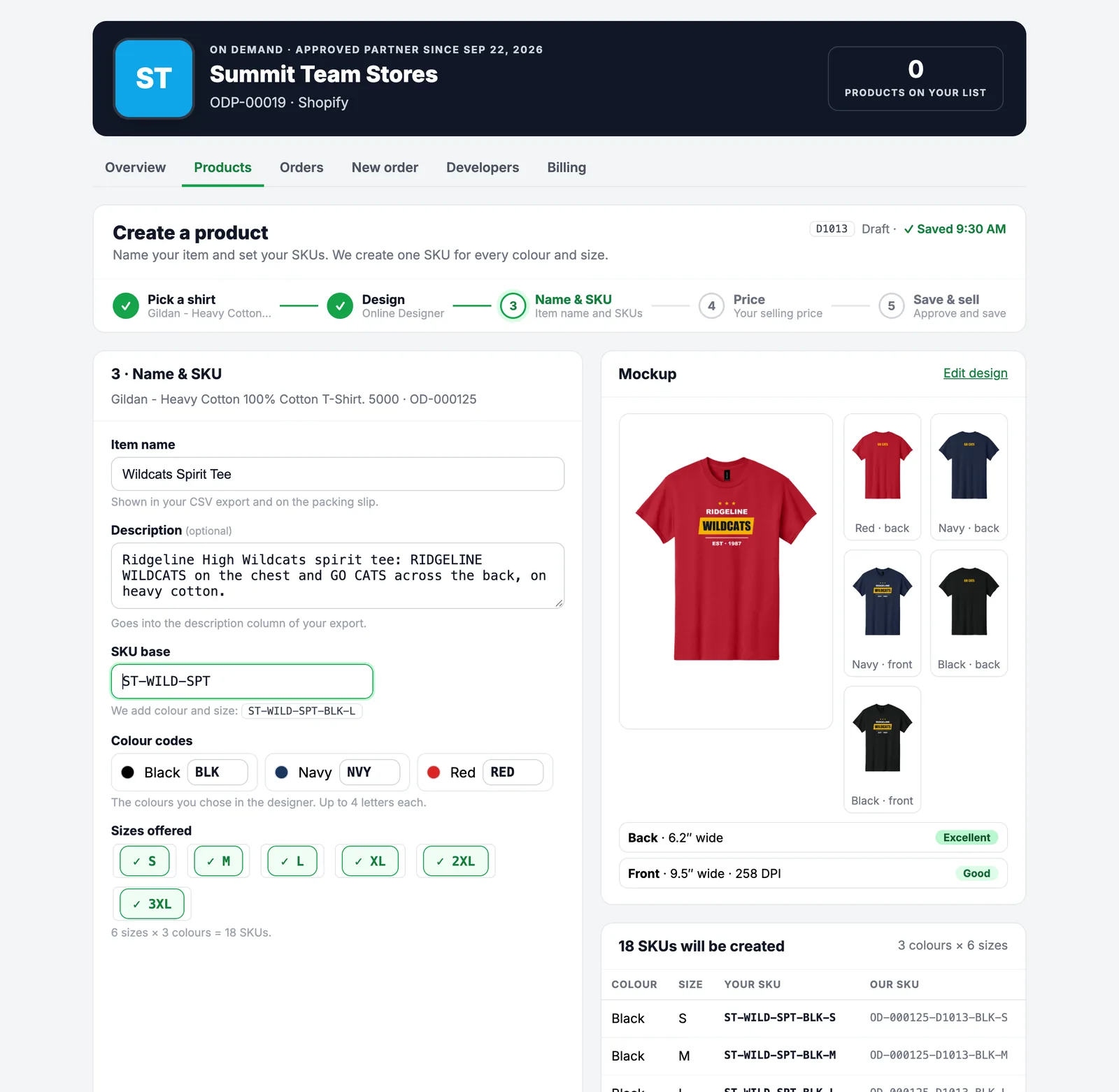
Name it and set your SKUs
Give your product the name your customers will see, an optional description, and your SKU base. We add a colour code and the size to make one SKU for every colour and size, and show your SKU next to ours as you type. Change a colour code or untick a size and the list updates on the spot.
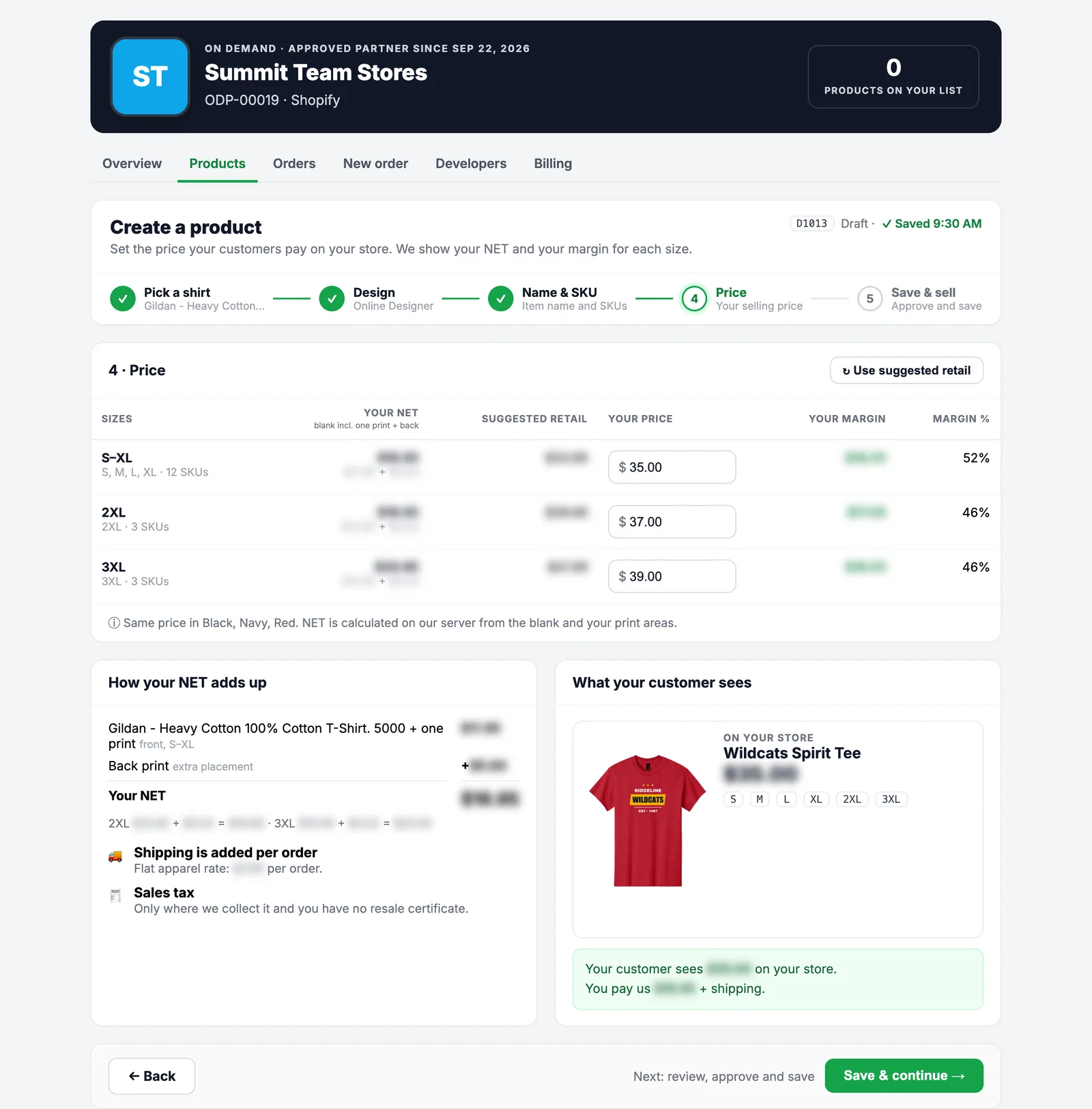
Set your price
For each group of sizes you see your NET price (the shirt with one print, plus any extra print areas), a suggested retail price, and the margin you make at the price you type. One click fills in the suggested prices. A preview shows what your customer sees on your store.
Approve it and save
Check everything once more: the mockups for every colour, the print areas and their quality, your SKUs, your prices and your margin. Then confirm two things: that every order of this product is printed exactly like this, and that you own or have the rights to the artwork, names and likeness in it.
Press Save & start selling. The design is locked, so every order prints exactly as you approved it.
Print check
Every design version gets automatic checks (inside the print area, resolution, transparent background, text size, colours) and a look from our team, including a check for third-party logos and names, usually the same business day. We make 300 ppi print files from your original artwork.
Start selling
As soon as it passes, your SKUs appear on your Products tab, in your CSV download and in the API, with mockups of your design on every colour. If we need a change, we tell you exactly what and you fix it in the designer.
Edit any time
Want to change a design that is selling? Editing makes version 2 while version 1 keeps selling. When version 2 passes the print check it takes over, and our SKUs for it stay the same.
Your customer only ever sees you
We ship every order as if it came from your own warehouse.
- ✓Shipping label: your business name and your phone number, so carrier questions reach you.
- ✓Packing slip: your name, your logo if you send us one, your order number and website, and the items, sizes and quantities. No prices.
- ✓No contact: we never email, text or call your customers. Their address and phone are used for delivery only.
- ✓No Promogator invoice in the box. Your invoices come to you, in your portal.
| ITEM | SIZE | QTY |
|---|---|---|
| Wildcats Spirit Tee · Black | L | 1 |
| Wildcats Spirit Tee · Navy | XL | 2 |
Example packing slip (sample partner)
Simple, per-order pricing. No subscription.
You pay for what you order, and you always see the full price before you place an order. Your NET prices are in your portal as soon as you are approved.
🏷️ NET price per piece
A wholesale price for each SKU (product, colour and size) with the decoration included. For your own designs, the NET includes one print; extra print areas add a small fee you see before you approve.
🚚 Shipping per order
Apparel ships at a flat rate per order, however many shirts are in it. Other products ship at the live carrier rate to your customer's address. Large freight items are quoted first. You decide what to charge your own customers for shipping.
🧾 Sales tax only where required
We collect sales tax only on orders shipped to California, Nevada and Texas. With an approved resale certificate for a state, we do not charge it there.
💳 Card on file or invoice
Keep a card on file and we charge it when we accept each order, with no card surcharge. Approved accounts can pay by invoice. Every order has an invoice in your portal.
✅ No monthly fee
No monthly fee, no sign-up fee, and no setup fee or minimum on tees you design. Some catalog products have a minimum, shown on the product.
↩️ Cancel within 24 hours
Cancel an order from your portal or the API within 24 hours of placing it, as long as production has not started.
A clean REST API for your store or platform
Connect any store, app or platform: JSON over HTTPS at https://www.promogator.com/api/on-demand/v1.
- Keys you control. Create test keys in your Developers tab and exchange a key for a 60-minute access token (OAuth 2 client credentials). Live keys are issued once your test orders work.
- Safe testing. Test orders are priced exactly like real ones but are never charged, made or shipped.
- Signed webhooks for
order.created,order.shippedandorder.cancelled, retried for about three days. - No double orders. Every new order carries an
Idempotency-Key, and you can look orders up by your own order number. - Clear money and errors. Amounts are exact decimal strings; errors come with a code, a plain explanation and a request ID.
- Full documentation online: API quick start, endpoints, webhooks and errors.
GET /catalog/productsyour productsGET /catalog/variants/{sku}one SKUPOST /quotesprice an orderPOST /ordersplace an orderGET /orders/{id}statusGET /orders/{id}/shipmentstrackingGET /orders/{id}/invoiceinvoicePOST /orders/{id}/cancelcancel
The response has your order's ID, the items at your NET price, shipping, tax and the total. When it ships, an order.shipped webhook brings the carrier and tracking number.
Everything partners ask us
More answers and step-by-step guides in the On Demand Docs & Help Center.
Is there a monthly fee?
No. There is no monthly fee and no sign-up fee. You pay only for the orders you send us: the NET price of each item, shipping, and sales tax where we have to collect it.
Is there a minimum order?
Tees you design in our Online Designer have no minimum: one shirt is fine. Some catalog products have a minimum quantity; when they do, it is shown on the product in your portal before you order.
How long does it take?
Every product shows its production time in business days in your portal and on every quote, before you place the order. Shipping time is added on top. Each order is made when it comes in, so you never wait for stock.
Will my customer see Promogator anywhere?
No. The shipping label shows your business name and your phone number. The packing slip shows your name, your logo if you send us one, your order number, and the items, sizes and quantities, with no prices. We never contact your customers; questions come to you.
Can I use my own SKUs?
Yes. Every product has our SKU, and for your own designs you choose your SKU base too. You can send orders with either one, in the portal or through the API.
Which files can I upload for a design?
PNG, JPG, SVG, PDF, AI and EPS, up to 20 MB each. For the sharpest print use artwork at 300 DPI at print size: about 3,600 × 4,800 pixels fills a 12″ × 16″ front. Vector files (SVG, PDF, AI, EPS) print sharp at any size.
Who checks my artwork?
Every design version gets automatic checks and a look from our team before it can take orders, usually the same business day. We check print quality and that the artwork does not use logos, names or likenesses you do not have the rights to.
How do I pay?
Most partners keep a card on file, which we charge when we accept each order, with no card surcharge. Approved accounts can pay by invoice. You see the full price of every order (items, shipping and any tax) before you place it.
Do you charge sales tax?
Only where we are required to collect it: California, Nevada and Texas. If you have a resale certificate for one of those states, upload it and, once we approve it, we do not charge sales tax on orders shipped there.
Can I cancel an order?
Yes, from your Orders tab or through the API, within 24 hours of placing it and as long as production has not started.
Where do you ship?
To addresses in the United States for now.
Does it work with Shopify, WooCommerce or my own site?
Yes. Download your products as a CSV (with your SKUs and your design mockups) to list them in any store, then type orders in on the New order page or send them automatically through our API. Partners on Shopify, Magento, WooCommerce, BigCommerce and custom websites can all use it.
Ready to sell custom merch without the stock?
We are opening On Demand to new partners. Tell us about your store and we will set you up and walk you through it.
- Tell us about your store
- Get approved and see your NET prices
- Pick products or design your own
- List them in your store
- Send us orders. We make and ship them in your name.

